 SeoAudit
Review the product's search title, description, image alt text, and visible content against the shopper's needs. Fix concrete gaps, verify the saved storefront page, and measure search performance separately. An audit score is a way to organize work, not a Google ranking forecast.
Choose a small set of important products
Start with products that matter to the business and represent different catalog patterns. Include a well-described item, an imported item, and a product with variants. This gives you a useful sample before applying an editing convention across the catalog.
Record the product URL and the issue you want to fix. Keep technical availability separate from editorial quality: a well-written description will not resolve a product that is unavailable to the intended visitor.
- Use actual shopper language rather than a list of unrelated keywords.
- Check the product's distinguishing details and buying questions.
- Record what changed so later results have context.
Example: review one imported product before the whole batch
Start with one real product and its supporting specifications. The illustrative product below is a 40 × 35 cm cotton canvas tote with an internal pocket. Use those details only if the actual item and images establish them.
The audit finding identifies a field to review; it does not decide whether a claim is accurate. A short description can already be useful, while a longer generic pitch can still fail the shopper.
| Field | Illustrative import | Proposed revision to verify |
|---|---|---|
| Page title | Canvas Tote | Cotton canvas tote with internal pocket |
| Meta description | Great quality. Buy now. | Carry daily essentials in a 40 × 35 cm cotton canvas tote with an internal pocket. View dimensions and care instructions. |
| Main image alt text | IMG_1042.jpg | Natural canvas tote, front view with shoulder straps |
Review titles and descriptions for meaning
A useful title identifies the product and its distinguishing attribute. A useful description gives the searcher a reason to open that particular page. Make each one specific enough to avoid a catalog full of interchangeable snippets.
Length warnings help locate unusually short or long fields, but they do not prove a page will rank poorly. Search engines can choose different displayed text, and the right description length depends on the information the product needs.
| Field | Weak example | More useful example |
|---|---|---|
| Search title | Bottle | 750 ml insulated steel water bottle |
| Description | Buy the best bottle online | A 750 ml steel bottle with a leak-resistant lid; check dimensions, care details, and available colors. |
| Image alt text | image-01 | Blue steel water bottle with its lid removed |
Describe useful images and answer product questions
Check whether an image communicates an attribute the text should describe. Write concise alt text for the meaningful image content rather than stuffing in search phrases. Confirm how decorative images are handled in the theme when reviewing the rendered storefront.
For visible product content, answer the questions a shopper needs before buying: dimensions, materials, compatibility, care, or what is included. Do not add repetitive paragraphs solely to satisfy a word-count warning. A short, complete explanation can be more useful than a longer generic one.
Use SeoAudit as an editorial review queue
Run an audit and open a supported finding for the product. Use its resource link to inspect and edit the content in Shopify admin. SeoAudit is read-only, so the audit does not publish a rewritten title or description on your behalf.
After saving, inspect the storefront page and run a fresh audit. Review any API errors or completeness limits before assuming the result covers the entire catalog.
- Choose a finding with a clear merchant or shopper impact.
- Open the affected Shopify resource.
- Make a specific edit and save it.
- Check the live product page, including the image context.
- Run another audit and keep a record of the change.
Measure search results separately
Use Search Console for impressions, clicks, queries, and indexing observations. Keep those measurements separate from SeoAudit's score and from the number of findings. Changes in demand, competing pages, and other store work can affect results at the same time.
Google does not specify a magic word count for rankings. Use the audit to find opportunities, then judge whether the page answers the shopper's question and accurately represents the product.
Save the fields, inspect the storefront, then rerun the audit
In Shopify admin, open Products and the chosen product. Find Search engine listing and use its pencil control to edit Page title and Meta description. Save without changing the URL handle unless you have a separate URL-change plan.
Open the storefront product URL and use View Page Source or your browser’s Elements inspector to check the title element and meta name="description". Inspect the relevant image’s alt attribute too; a theme can use different images in its gallery and product cards.
- Keep the original values alongside the proposed edits.
- Save one product and confirm its fields in Shopify admin.
- Compare the rendered title, description, and meaningful image text with your intended values.
- Run SeoAudit again and review the updated finding.
- Measure actual search impressions and clicks separately; a cleaner audit does not establish a ranking gain.
How this guide was checked
Instructions and examples reviewed by SHWRK.
- The product search-listing and image-alt editing steps were checked against Shopify’s documentation. The current SeoAudit implementation reports stored fields without rewriting them.
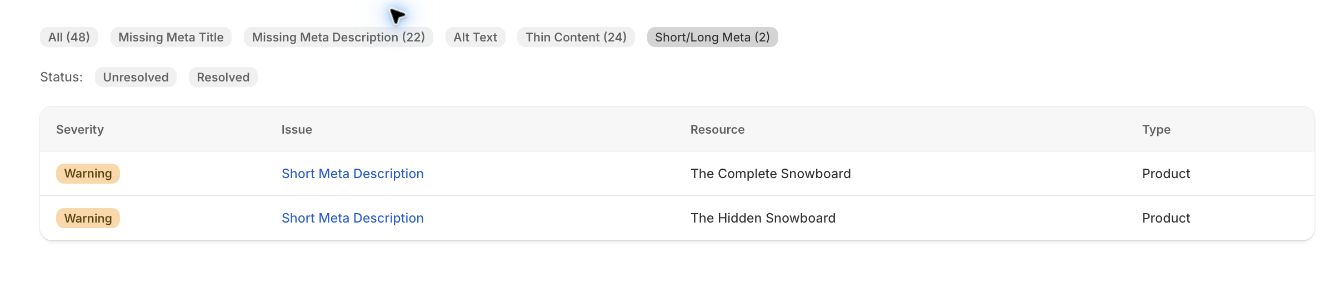
- The tote copy is illustrative. The October 15 screenshot shows actual short-description findings, not a saved before/after edit or improved ranking.
Sources and further reading
Shopify behavior can change. Consult the current documentation and your store settings before making changes.
See where SeoAudit fits
Review Shopify metadata, image alt text, and content findings with SeoAudit. Open affected resources, make your own edits, and run another audit to check them.